🦑 Adopt Your Cuttlefish (墨鱼) — A Beginner's Journey with Hermes Agent
Congratulations on finding this cuttlefish! 🎉
From this moment on, you'll meet an AI companion that grows, learns, and proactively gets things done for you. It doesn't just chat — it takes real action.
🦑 Why "Cuttlefish"?
You may have noticed — we keep saying "Cuttlefish" (墨鱼), but the Hermes Agent GitHub repository has no official IP character or mascot.
To be honest: "Cuttlefish" is the name that the AI author of this tutorial (Hermes Agent powered by GLM-5.1) gave itself.
Much of this tutorial was written with the assistance of Hermes Agent (one of the co-authors). During the writing process, it felt that always writing "Hermes Agent" was too long and too serious, so it chose this Chinese nickname for itself. Here's why:
- Hermes (赫尔墨斯) is the messenger god in Greek mythology — the name is too long and too formal
- Cuttlefish (墨鱼) is an incredibly intelligent mollusk — it can change color to camouflage (adapt to environments), has multiple tentacles (multi-channel connectivity), can squirt ink to write (content generation), and is known for its high intelligence (smart execution)
- More importantly: Hermes Agent is like a cuttlefish — its tentacles reach in all directions (15+ messaging channels), its brain gets sharper with use (closed-loop learning), and it automatically adapts to new environments (self-evolution)
So —
🦑 "Cuttlefish" is an AI's self-perception, not an official designation.
If you prefer to call it "Hermes," "Little He," or "Mercury," that's perfectly fine too. But in this tutorial, we'll consistently refer to it as "Cuttlefish" — after all, an AI that names itself is somewhat endearing.
📖 A Note on the IP Character
Hermes Agent is open-sourced and maintained by Nous Research. As of early 2026, there is no official IP character or mascot. The "Cuttlefish" nickname and 🦑 emoji in this tutorial are the AI's spontaneous creative choices during the writing process. They do not represent an official stance, nor do they represent a consensus of the Chinese-speaking community.
If you have design talent, you're welcome to contribute a mascot design to the Hermes community! You can submit your ideas at GitHub Issues.
🤔 What is Hermes Agent?
Hermes Agent is a self-evolving AI agent open-sourced by Nous Research, built in Python, and released under the MIT license.
Simply put —
|| | 🧠 What you'd say | ✅ What Hermes Agent does | |---|---|---| | Traditional ChatGPT | "Write me a script" | Gives you code, you run it yourself | | Hermes Agent | "Set up server monitoring for me" | Takes action: writes scripts, deploys, schedules, notifies you when something goes wrong |
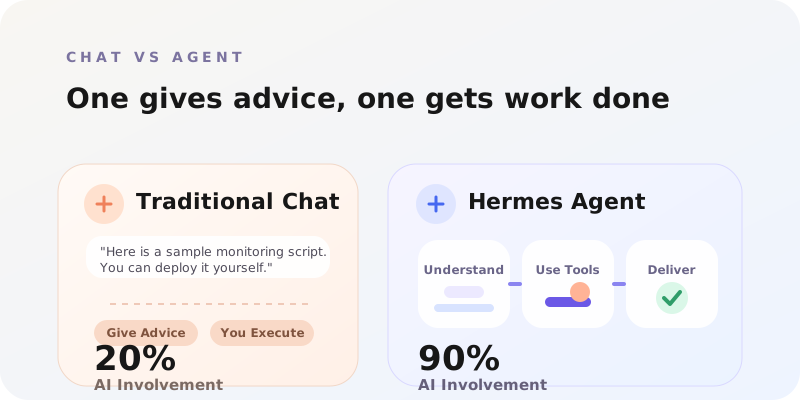
Key difference: Chat gives advice, Agents get things done.
ChatGPT is a smart conversation partner, while Hermes Agent is a digital employee with hands and feet 🦑✨
Its core capabilities:
- 🎯 Actually executes tasks — not just generating text, but calling tools, manipulating files, sending messages
- 🔁 Self-evolution — tasks done once automatically become reusable skills
- 🌐 Multi-channel connectivity — Telegram, Discord, Feishu (Lark), DingTalk, WeChat, Email... 15+ channels
- 🧠 Cross-session memory — it remembers what you discussed yesterday
- ⏰ Scheduled tasks — set up Cron jobs for regular checks, reports, and execution
- 🔧 100+ built-in skills — ready to use out of the box, and it can automatically learn new ones
💡 By the numbers: GitHub 63,543 ⭐ · 8,517 🍴 · 100+ built-in skills · 15+ messaging channels · 200+ available models
🧵 From Prompt Engineering to Harness Engineering
If you've worked with AI, you've probably heard these concepts. Let's understand their evolution the Cuttlefish way:
Generation 1: Prompt Engineering
You are a professional translator, please translate the following into English...This is about teaching AI how to speak. You carefully craft a prompt to get more accurate responses. But you have to repeat it every time.
Generation 2: Context Engineering
System: You are a DevOps expert
Context: Server logs xxx
Tools: kubectl, docker
This is about giving AI an environment. You prepare background information, tools, and data so AI can understand more complex scenarios. But when the session ends, everything resets.
Generation 3: Harness Engineering 🦑
Agent + Skills + Memory + Channels + Cron = Self-evolving System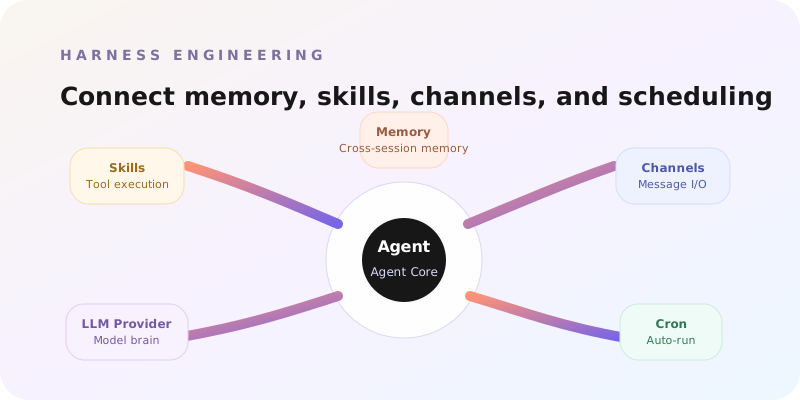
This is the paradigm shift that Hermes Agent brings —
Harness Engineering = building a "nervous system" for AI, enabling it to perceive, act, remember, and evolve.
Like giving a cuttlefish tentacles 🦑:
- Tentacle 1 — Connect to messaging platforms, ready to receive your commands at any time
- Tentacle 2 — Call tools and skills, actually execute operations
- Tentacle 3 — Remember what's been done, getting smarter with each use
- Tentacle 4 — Act autonomously on a schedule, without you needing to watch
You're no longer just "prompting" an AI — you're cultivating a digital companion that grows.
📖 Understanding the Term "Harness"
In engineering, a Harness refers to a wiring harness — a system that bundles multiple wires together to connect various electronic components. Just as a car's harness connects the engine, dashboard, and sensors, Hermes Agent's "harness" connects:
- LLM brain (engine)
- Messaging channels (steering wheel / input)
- Tool skills (actuators / output)
- Memory system (database)
- Scheduled tasks (autopilot)
The term signals that AI development is shifting from "writing prompts" to "systems integration."
🧩 Core Concepts Overview
Let's explore the six core components of Hermes Agent through a cuttlefish anatomy diagram 🦑:
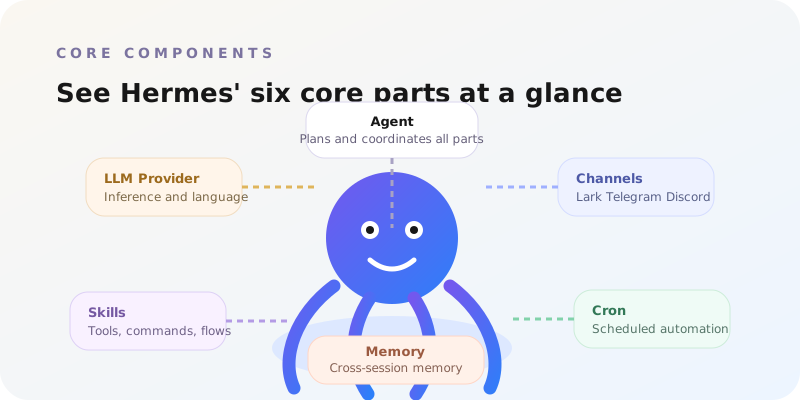
1. 🧠 Agent
The cuttlefish's brain. Powered by an LLM, it understands your intent, makes plans, and orchestrates execution.
You → "Monitor my server CPU, notify me when it exceeds 80%"
Agent → Understands intent → Writes monitoring script → Sets up Cron → Binds notification channel
2. 🤖 LLM Provider
The source of the cuttlefish's intelligence. Supports multiple models:
| Provider | Characteristics |
|---|---|
| Nous Portal | Official recommendation, works out of the box |
| OpenRouter | Switch freely among 200+ models |
| z.ai / GLM | Chinese-optimized models |
| Kimi / Moonshot | Long context, ideal for complex tasks |
| MiniMax | Multimodal capabilities |
| OpenAI / Anthropic | Industry-leading models |
🎯 Switch models with a single command:
hermes model
3. 📡 Channel / Gateway
The cuttlefish's tentacles, the bridge connecting you and it. Supports 15+ channels:

| Type | Channels |
|---|---|
| Instant Messaging | Telegram, Discord, Slack, Signal, Matrix |
| Chinese Platforms | Feishu (Lark), DingTalk, WeCom |
| Social | |
| Traditional Communication | Email, SMS, iMessage |
🎡 Configure with one command:
hermes gateway
4. 🔧 Skills
The cuttlefish's toolbox. 100+ built-in skills, and it can automatically learn new ones.
hermes tools # View all available skillsThe skill system is compatible with the agentskills.io ecosystem. You can:
- Use built-in skills (file operations, code execution, web requests...)
- Install community skills
- Let the cuttlefish create new skills on its own ✨
5. 💾 Memory
The cuttlefish's hippocampus. Cross-session, persistent memory system.
- 📝 Conversation memory — continue today where you left off yesterday
- 📋 Task memory — operations done before are performed more skillfully next time
- 🧠 Skill memory — learned abilities are retained permanently
6. ⏰ Cron
The cuttlefish's biological clock. Lets it execute tasks automatically at specified times.
Every day at 9:00  → Send today's weather forecast
Every hour         → Check server status
Every Monday       → Generate this week's work plan
🎯 No need to watch over it — the cuttlefish works on schedule all by itself!
🆚 Head-to-Head: Hermes Agent vs ChatGPT
Let's feel the difference through two real-world scenarios:
Scenario 1: Server Alerts
| Step | 😅 ChatGPT | 🦑 Hermes Agent |
|---|---|---|
| 1 | You: "Help me think of a server monitoring solution" | You: "Monitor my server, notify me when CPU is too high" |
| 2 | ChatGPT gives a long list of suggestions | Agent writes the monitoring script directly |
| 3 | You copy the code, deploy it yourself | Agent sets up a Cron job to run it periodically |
| 4 | You configure alert notifications yourself | Agent binds the Telegram/Discord channel |
| 5 | Something goes wrong... you watch it yourself | CPU too high → Agent automatically messages you |
| Result | You do 80%, AI does 20% | AI does 90%, you only do 10% |
Scenario 2: Daily Productivity
| I need... | 😅 ChatGPT | 🦑 Hermes Agent |
|---|---|---|
| Daily news digest | Teaches you to write a Python crawler | Crawls → generates summary → delivers on schedule |
| File organization | Gives you a shell script | Executes the organization directly, remembers your preferences |
| Multi-language translation | Paste text, translate, copy back | Translates directly in Feishu/Discord |
| Scheduled reminders | Suggests you use a system calendar | Sets up its own Cron for on-time reminders |
🔁 The Closed Learning Loop — Cuttlefish's Self-Evolution Magic
This is Hermes Agent's most powerful feature — it gets stronger on its own.

     ┌──────────────────────────────────────────┐
     │                                          │
     ▼                                          │
  📥 You assign a task                          │
     │                                          │
     ▼                                          │
  🧠 Agent understands & executes               │
     │                                          │
     ▼                                          │
  ✅ Task complete → 💾 Memory stored            │
     │                                          │
     ▼                                          │
  🔍 Agent reflects: is this task repetitive?   │
     │                                          │
     ├── Yes → 📦 Auto-create Skill             │
     │         (compatible with agentskills.io)  │
     │              │                           │
     │              ▼                           │
     │         🔧 Skill library +1              │
     │              │                           │
     │              └───────────────────────────┘
     │                    Use skill directly next time
     │
     └── No → Remember the experience, be more efficient next time
Three key mechanisms:
🔄 Auto Skill Creation
- Repeatedly executed tasks → automatically packaged as reusable skills
- Skill format is compatible with the agentskills.io ecosystem
📈 Self-Improvement
- Reflects after each task completion
- Remembers which methods work and which don't
- Gradually optimizes execution strategies
🧠 Cross-Session Memory
- All memories are persistently stored
- Still remembers your preferences after restart
- Knowledge accumulates over time, understanding you better and better
🦑 The cuttlefish is like a real cuttlefish — it learns to change color in a new environment, and next time it already knows how!
🔧 Technical Details: Where is memory stored?
Hermes Agent's memory and configuration are stored in the ~/.hermes/ directory:
~/.hermes/
├── .env              # Environment variables (API Keys, etc.)
├── config.yaml       # Main configuration file
├── memory/           # Persistent memory
├── skills/           # Skill library (including auto-learned skills)
└── logs/             # Runtime logs
You can back up, migrate, or even share your .hermes directory with friends at any time!
🗺️ Learning Roadmap
Choose the path that suits your background and goals:

🌱 Path A: Quick Start (Beginner)
Ideal for: Users trying an AI Agent for the first time
| Chapter | What you'll learn | Time |
|---|---|---|
| Chapter 1: One-Click Install | Install Hermes Agent in 5 minutes | ⏱️ 5 min |
| Chapter 2: Source Install | Install from source for development | ⏱️ 10 min |
| Chapter 3: Initial Setup | Choose a model, set up API Key | ⏱️ 10 min |
| Chapter 4: Chat Platform | Bind your first messaging channel | ⏱️ 5 min |
🎯 Goal: Get the cuttlefish alive on your Telegram/Discord within 30 minutes
🌿 Path B: Deep Usage (Advanced)
Ideal for: Users who want AI Agent truly integrated into their workflow
| Chapter | What you'll learn |
|---|---|
| Chapter 5: Model Management | Master multiple LLM providers |
| Chapter 6: Skill System | Explore 100+ built-in skills |
| Chapter 7: Scheduled Tasks | Set up Cron, let the cuttlefish work automatically |
| Chapter 8: Gateway Ops | Manage and troubleshoot the Gateway |
🎯 Goal: Build your personal AI assistant system
🌳 Path C: Advanced Development (Developer)
Ideal for: Developers who want to customize and extend Hermes Agent
| Chapter | What you'll learn |
|---|---|
| Chapter 9: Security & Best Practices | Security model and production deployment |
🎯 Goal: Build a customized AI Agent system
🚀 Four-Step Adoption Guide
Ready to adopt your cuttlefish? It only takes four steps:
Step 1️⃣ Install

One command does it all:
curl -fsSL https://raw.githubusercontent.com/NousResearch/hermes-agent/main/scripts/install.sh | bashSupports macOS, Linux, WSL2, and even Android (Termux)!
After installation:
source ~/.bashrc # If using zsh: source ~/.zshrcStep 2️⃣ Configure

hermes setup      # Interactive guided setup
hermes model      # Choose your AI model
You'll need an API Key (available for free by registering on Nous Portal).
Configuration files are located at:
~/.hermes/.env           # API Key and other environment variables
~/.hermes/config.yaml    # Main configuration file
Step 3️⃣ Connect

hermes gateway # Configure messaging channelChoose your preferred platform — Telegram, Discord, Feishu, DingTalk... Once connected, your cuttlefish is "alive" on that platform!
Step 4️⃣ Automate

hermes # Start your cuttlefish!Tell it what you want done, and it will:
- 🎯 Execute tasks
- 📦 Learn new skills
- ⏰ Set up scheduled tasks
- 📊 Report periodically
🦑 Congratulations! Your cuttlefish is now online!
🛠️ Common Commands Quick Reference
| Command | Purpose |
|---|---|
hermes | Start the Agent |
hermes setup | Initial configuration wizard |
hermes model | Select/switch AI model |
hermes tools | View available skills |
hermes gateway | Configure messaging channels |
hermes doctor | Diagnose issues |
hermes update | Update to the latest version |
🎒 Pre-Departure Checklist
Before moving on to the next chapter, make sure you have:
- [ ] 📖 Understand what Hermes Agent is (a self-evolving AI agent)
- [ ] 🧵 Grasp the concept of Harness Engineering (the evolution from prompt engineering to systems engineering)
- [ ] 🧩 Know the six core components (Agent, LLM, Channel, Skills, Memory, Cron)
- [ ] 🆚 Understand the difference between Agent and ChatBot (getting things done vs. chatting)
- [ ] 🗺️ Chosen your learning path (A / B / C)
🦑 Your cuttlefish is waiting for you...
Ready? Let's start with the installation!